Modelling simple elastic shells

brisidi
Posts: 9
Joined: Fri Oct 02, 2020 4:04 pm

Re: Modelling simple elastic shells

Post by brisidi » Tue Oct 13, 2020 3:21 pm

Thanks! Here is the output I get:
Image

When I press a key once, the message repeats. The second time I press a key the terminal closes.

STKO Team
Posts: 3066
Joined: Tue Oct 29, 2019 8:45 am

Re: Modelling simple elastic shells

Post by STKO Team » Wed Oct 14, 2020 6:50 am

Ok, I think you are not passing the file name to opensees. Can you post a screenshot of your analysis kits editor? One when you select your manual solver Opensees.exe, and another when you select the run_opensees.bat . I need to see the complete command that appears in the bottom text line. I assume there is no %1 at the end... While it should be there, it is a place holder for the file name to pass to opensees.

Note: in the bat version, you need to click twice to exit because there is the pause command both in the bat file and in STKO... It's just a test

brisidi
Posts: 9
Joined: Fri Oct 02, 2020 4:04 pm

Re: Modelling simple elastic shells

Post by brisidi » Wed Oct 14, 2020 8:49 am

I am not sure if I understood correctly what you asked. Here is a screenshot of "Kits":
Image

The terminal just reads:

Code: Select all

Command: Kits
End Command: Kits
To select "OpenSees.exe" I just go to Manual (0), which looks like this:
Image

I then go to Solver and select either "Manual (0)" for OpenSees.exe or "Manual (1)" for the bat file.

Here is what the bat file contains:

Code: Select all

OpenSees.exe %1
pause

brisidi
Posts: 9
Joined: Fri Oct 02, 2020 4:04 pm

Re: Modelling simple elastic shells

Post by brisidi » Wed Oct 14, 2020 8:54 am

I added "%1" at the end of the OpenSees file address in "Kits" and here is the result (the terminal is also visible):
Image

STKO Team
Posts: 3066
Joined: Tue Oct 29, 2019 8:45 am

Re: Modelling simple elastic shells

Post by STKO Team » Thu Oct 15, 2020 8:14 am

Exactly what I thought.
The Command string for your 2 manual solvers are missing the #1 keyword.

The #1 keyword is used as a place-holder that STKO will replace with the filename of the TCL script to run.

There is another keyword, #2, that instead is used a place-holder for the number of processor. This is of course only useful with OpenSeesSP and OpenSeesMP (parallel versions).

Please change the Command string adding the #1 keyword as in this example:
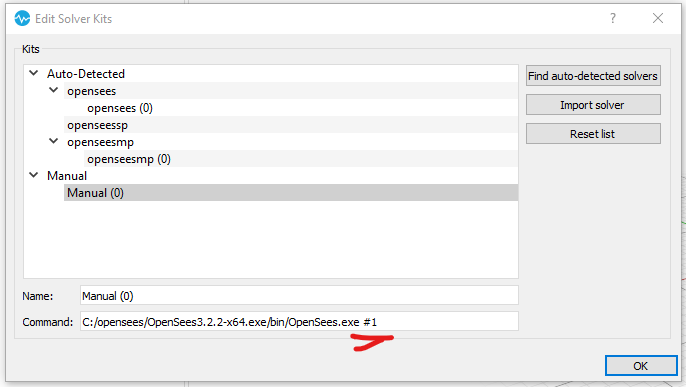
sequential.png
sequential.png (19.21 KiB) Viewed 3370 times

Instead, if you want to use parallel versions of OpenSees you can also add the #2 keyword as in my OpenSeesMP batch file:
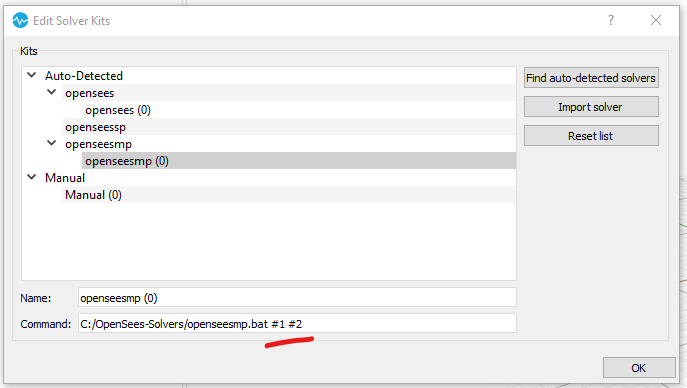
parallel.png
parallel.png (19.86 KiB) Viewed 3370 times

brisidi
Posts: 9
Joined: Fri Oct 02, 2020 4:04 pm

Re: Modelling simple elastic shells

Post by brisidi » Thu Oct 15, 2020 8:19 am

Thanks, that solves my problem. I am sorry that I wasted your time with such a small issue that was ultimately my fault. Keep up the good work!

Post Reply