Page 1 of 2
soil material stress-strain result
Posted: Fri Mar 26, 2021 2:15 pm
by begumemte1991
I have analysed a soil-pile system where I want to read the material stresses and strain of the soil elements. In Opensees if we set the recorders (for eg. "recorder Element -file Gstress1.out -time -eleRange 1 $nElemT material 1 stress") we can extract the data very easily and then for a particular element we can read the stresses and strain. But I am finding it difficult to extract the results in STKO postprocessor. No doubt we can view the contours of stresses and strains for the whole geometry, but getting the data in each and every element is difficult.
I have even tried to manually extract the data through the "custom command" option, but in the .out file nothing was there except the time column.
Also, if I want the displacement (or bending moment) at each node (or element) of the pile, it is very difficult to extract it because the pile is hiding inside the soil. Selecting each node becomes very difficult and tedious.
I hope there are some other alternatives to this. Please shed some light in to it. Thank you.
Re: soil material stress-strain result
Posted: Fri Mar 26, 2021 5:09 pm
by STKO Team
I have even tried to manually extract the data through the "custom command" option, but in the .out file nothing was there except the time column.
Probably you wrote it wrong. Can you share your script?
And what element are you using?
lso, if I want the displacement (or bending moment) at each node (or element) of the pile, it is very difficult to extract it because the pile is hiding inside the soil. Selecting each node becomes very difficult and tedious.
If you want to select something that is hiding, you can hide the surrounding geometries with the Hide/Show command.
Furthermore, starting from STKO version 2.0.0, we can use automation using the Python API.
Have a look at the latest webinar about the Python API in the STKO post processor. We explain exactly that: how to extract data programmatically from the STKO post processor
Re: soil material stress-strain result
Posted: Fri Mar 26, 2021 6:36 pm
by begumemte1991
Thank you for your quick reply.
Can you share your script?
I have shared the .scd file herewith.
And what element are you using?
I am using SSPbrick for soil model.
If you want to select something that is hiding, you can hide the surrounding geometries with the Hide/Show command.
I wrote it wrong. Definitely the soil can be hidden by the show/hide command but my pile is modelled with a beam-column element and it is a hollow circular section. So, I can't click the inside nodes (I hope you can understand what I meant to say, it will be clear once you run my file). I don't know if there is some other way to do it.
Have a look at the latest webinar about the Python API in the STKO post processor.
Surely, I will watch the video. But for non python users like me lets see how it turns out.

Thank you.
Re: soil material stress-strain result
Posted: Mon Mar 29, 2021 4:51 pm
by STKO Team
Your custom element recorder commands do not work because you are running the OpenSeesMP (parallel) version. It is quite difficult to write correctly those recorders for the OpenSeesMP. Because the model is partiitoned, so you would need to write 1 recorder for each partition, including only nodes/elements on that partition. I gave an explanation in the latest webinar explaining a similar issue with the Drift recorder in OpenSeesSP
I am using SSPbrick for the soil model.
You correctly asked for "stress" and "strain" (and not "material.stress" and "material.strain") in the MPCO Recorder, because the SSPbrick element has only 1 gauss point, and it does not accept the "material" keyword. In fact those results are visible in the STKO post processor.
I wrote it wrong. Definitely the soil can be hidden by the show/hide command but my pile is modelled with a beam-column element and it is a hollow circular section. So, I can't click the inside nodes (I hope you can understand what I meant to say, it will be clear once you run my file). I don't know if there is some other way to do it.
You need to isolate the beam elements with the hide/show command. Then, to hide the beam-section extrusion, just un-check that option. You can also check the option to visualize the nodes, so it will be easier for selection
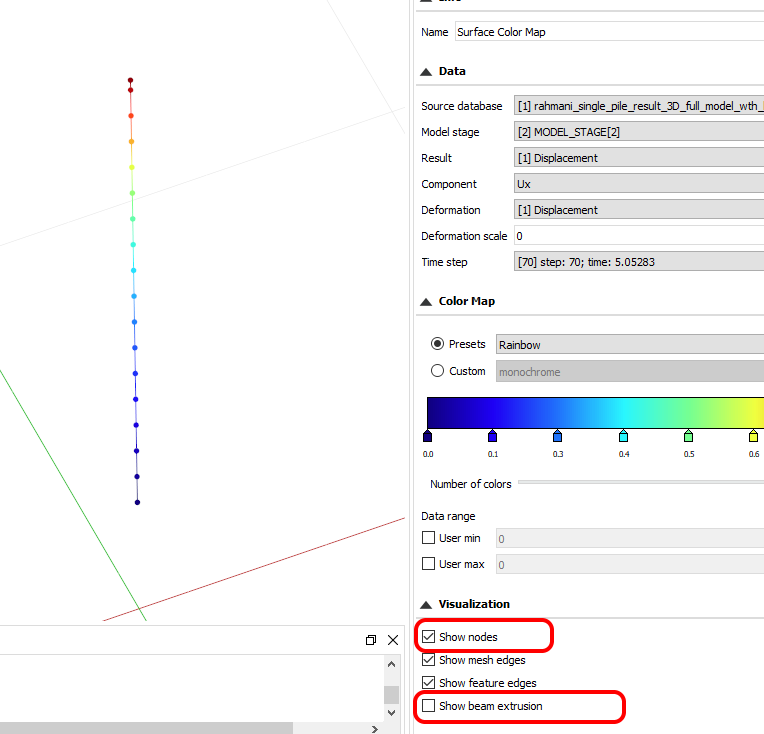
- isolate_beam.png (35.69 KiB) Viewed 4401 times
Re: soil material stress-strain result
Posted: Sat Apr 03, 2021 2:18 pm
by begumemte1991
Ok got it! Thank you.
I gave an explanation in the latest webinar explaining a similar issue with the Drift recorder in OpenSeesSP
Can you please mention which webinar as there are a number of recent webinars. I tried to watch a few of them but could not find it.
Re: soil material stress-strain result
Posted: Tue Apr 06, 2021 3:51 am
by begumemte1991
Dear team STKO,
I gave an explanation in the latest webinar explaining a similar issue with the Drift recorder in OpenSeesSP
Please mention the title of the webinar.
Re: soil material stress-strain result
Posted: Tue Apr 06, 2021 7:35 am
by Clarabella
Dear Begumemte,
this is the link:
https://www.youtube.com/watch?v=TrHhvJ8L9ao
Reagards
Re: soil material stress-strain result
Posted: Tue Apr 06, 2021 8:51 am
by begumemte1991
Thanks a lot!
Re: soil material stress-strain result
Posted: Sat Apr 10, 2021 11:00 am
by Horace Horsecollar
You are welcome!
Re: soil material stress-strain result
Posted: Fri Apr 23, 2021 11:14 am
by begumemte1991
Hello team STKO,
Your custom element recorder commands do not work because you are running the OpenSeesMP (parallel) version. It is quite difficult to write correctly those recorders for the OpenSeesMP. Because the model is partitioned, so you would need to write 1 recorder for each partition, including only nodes/elements on that partition.
If possible can you please write and post a python script for extracting the output data (for example, nodal displacements) manually with custom command when running with the OpenSeesMP?