Hi,
I recently bought a one year version of the STKO. I downloaded it in C drive. When I take a sample file "column uniform excitation" I found somewhere in the forum to run the analysis, I come across an error: "You must select a solver kit to run the analysis".
The Opensees, Openseessp, and Openseesmp are listed in the auto detected list. But the solver kit is empty and the drag down button doesn't show any options. (I have attached a screenshot for refererence)
Please help!!
solver kit error
Re: solver kit error
Hi Alok,
In the auto-detected you see openees, openseessp, and openseesmp, but those are only the groups of auto-detected solvers. You should see something under those nodes:
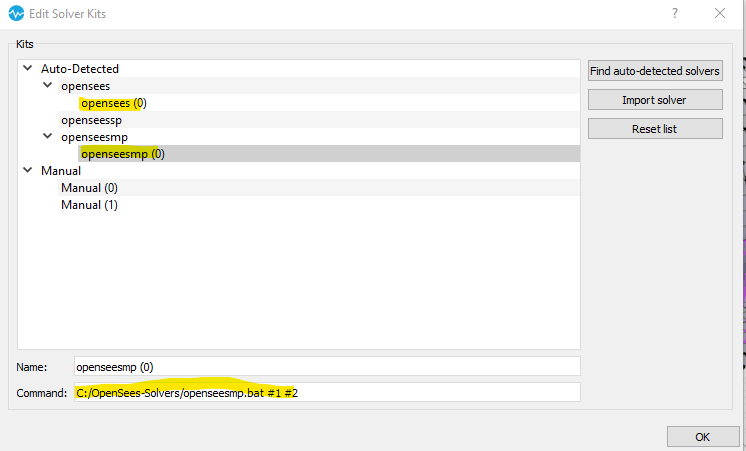
It looks like you don't have any opensees installed, or it is installed in a location not found by STKO.
You can download a pre-compiled unofficial version of OpenSees/OpenSeesMP 3.2.0 (compiled by prof. Tarque of PUCP university of Peru). It is an installer that will install those solvers in C:\OpenSees-Solvers, which is one of the locations STKO looks for auto-detected solvers.
Here is the link to the webpage:
https://www.pucp.edu.pe/profesor/sabino ... ducciones/
There you should find the link to the solvers installer:
https://drive.google.com/file/d/1ETGQ3Y ... sp=sharing
After installing them, re-launch STKO and it will find them automatically
Keep in mind they are compiled for Windows 64 bit, and the parallel OpenSeesMP is more specific to Windows 10 64 bit. If you have another operating system you need to download the official opensees source code and compile it.
Let me know if it works
In the auto-detected you see openees, openseessp, and openseesmp, but those are only the groups of auto-detected solvers. You should see something under those nodes:
It looks like you don't have any opensees installed, or it is installed in a location not found by STKO.
You can download a pre-compiled unofficial version of OpenSees/OpenSeesMP 3.2.0 (compiled by prof. Tarque of PUCP university of Peru). It is an installer that will install those solvers in C:\OpenSees-Solvers, which is one of the locations STKO looks for auto-detected solvers.
Here is the link to the webpage:
https://www.pucp.edu.pe/profesor/sabino ... ducciones/
There you should find the link to the solvers installer:
https://drive.google.com/file/d/1ETGQ3Y ... sp=sharing
After installing them, re-launch STKO and it will find them automatically
Keep in mind they are compiled for Windows 64 bit, and the parallel OpenSeesMP is more specific to Windows 10 64 bit. If you have another operating system you need to download the official opensees source code and compile it.
Let me know if it works
-
alokbhatta
- Posts: 16
- Joined: Thu Jun 25, 2020 11:26 pm
Re: solver kit error
It is working now. Thanks! Much appreciated.