Page 1 of 1
Contact two solids
Posted: Fri Sep 27, 2024 2:09 pm
by MusZip
Hello,
I try to simulate a typical example presented in the previous webinars.
Altough I give a serious attention for modelling this structural system, I can not run it. I can not find my skipped or ignored step.
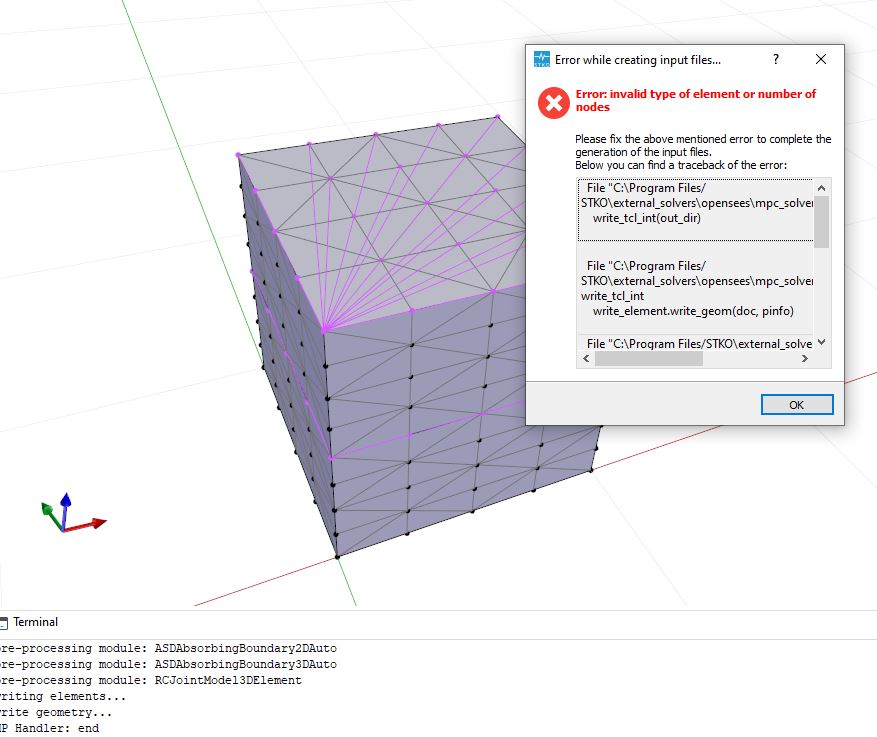
- Lesson6_error.JPG (81.15 KiB) Viewed 531 times
The other important detail is that I can not to correctly mesh the structural system as in the orginal one. Although I try the different meshing combinations and the meshing command option "edge" , I can not obtain such an orginal meshing.
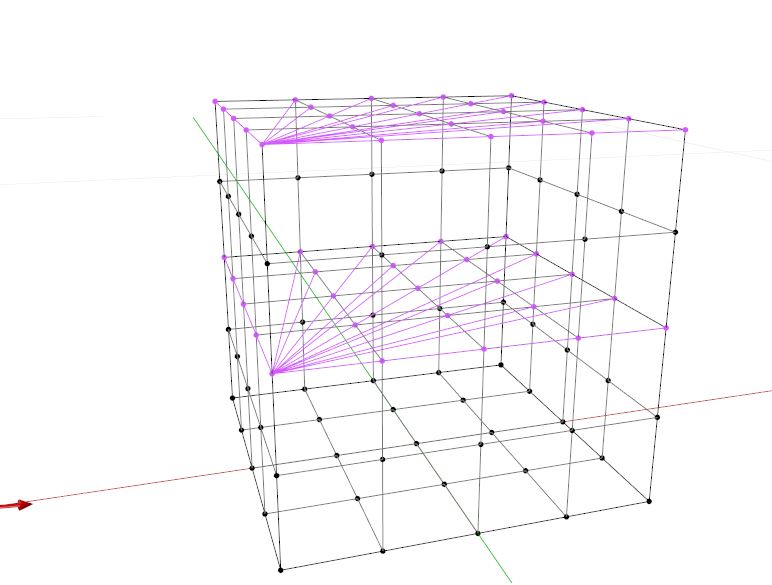
- Lesson6_orginal.JPG (50.95 KiB) Viewed 531 times
Re: Contact two solids
Posted: Sat Sep 28, 2024 5:22 am
by kesavapraba
You have applied brick element (8 noded) to tetrahedron meshes (4-noded), hence the error appeared due to improper assignment of element. You can mesh the solid by selecting proper mesh control parameters (see the attached figure), go ahead with "structured" and "hexa" for using brick elements in your case.
Re: Contact two solids
Posted: Tue Oct 01, 2024 8:11 am
by MusZip
Dear Kesavapraba,
Thank you very much sincerely,
Although I change the meshing adjustment as "strutctured" and "hexa" (see Lesson6_new.rar) , I get same error mesage (Lesson6_error_new.JPG).
Also, I ask you what is the reason of fact that the meshed structural members in my model has braced lines within each meshed structural members. However, the orginal meshing contains only the complete cubic structural members. Therefore, in my model, the number of meshed structral member is increased with respect to orginal one (see Lesson6_MeshingProblem.JPG).
Re: Contact two solids
Posted: Tue Oct 01, 2024 9:21 am
by kesavapraba
Hi, Your model just works fine from my side! Please see the attached model and figures.
Lines, like 'bracing', indicates tetrahedron meshes for your solids, still the meshes are not hexa! So, the error occurred while trying to apply eight-noded brick element to four-noded meshes. You have to correctly do the meshing by selecting and assigning the structured and hexa option.
Re: Contact two solids
Posted: Tue Oct 01, 2024 12:14 pm
by MusZip
Hello,
Yes you are right. I noticed to neglect the assigning step. This is completely my carelessness. Now, after I increase the pushing load in order to observe the deformation more clearly, its deformed case is seen in "Lesson6_Sucessful.JPG".