Page 1 of 1
Getting only Tetra element in mesh
Posted: Mon Jul 15, 2024 10:37 pm
by nmorabowen
Hi, I am trying to generate HEXA elements in my model.
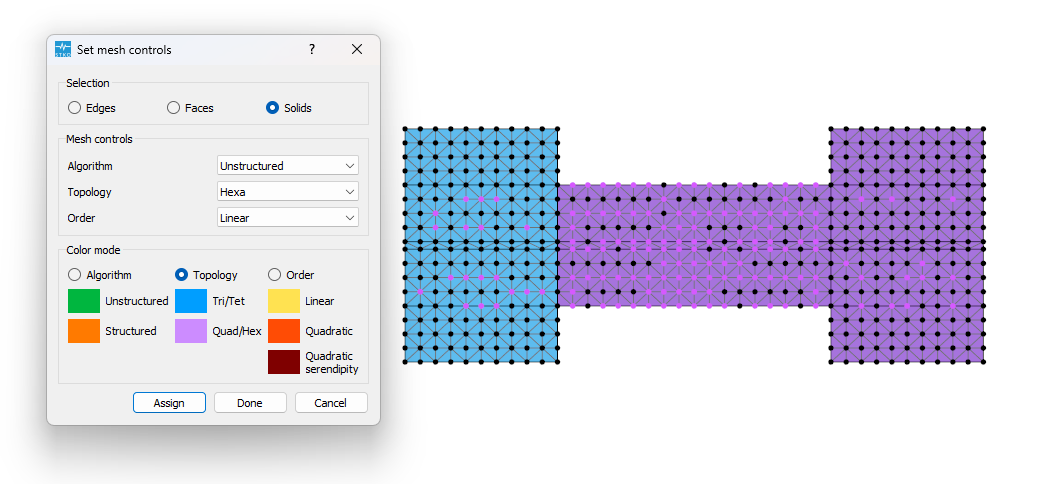
- HEXA_Elements.png (117.67 KiB) Viewed 3727 times
I imported the geometry from an igs file, and then I merged the elements.
I am not able to generate hexa elements.
Could you help me point out what I'm missing?
Thanks.
Re: Getting only Tetra element in mesh
Posted: Tue Jul 16, 2024 4:14 am
by kesavapraba
Hi, It seems either your geometry file is corrupted or there is some inconsistency in the geometry shapes merge process. I did a clean geometry of the concrete region of your model in STKO itseld. It works now. Please see the attached figure and file.
Re: Getting only Tetra element in mesh
Posted: Tue Jul 16, 2024 2:39 pm
by nmorabowen
Thank you for your time!, could you please tell me how did you clean up the geometry?
Re: Getting only Tetra element in mesh
Posted: Wed Jul 17, 2024 9:42 am
by kesavapraba
Hi, In your case I redrew the geometry considering the front face after exploding the geometry multiple times. But, the real issue is that sometime there can be overlapping muti-faces/edges, which can prevent proper meshing. It can happen during import from other CAD software - you need to be aware of it. My experience is that import/export is not 100% perfect between different software!Please check the meshing right after importing the geometry.
Re: Getting only Tetra element in mesh
Posted: Wed Jul 17, 2024 5:50 pm
by nmorabowen
Thank you!
Re: Getting only Tetra element in mesh
Posted: Tue Jul 23, 2024 4:09 pm
by kesavapraba
You are welcome